Showing posts with label Cool stuff. Show all posts

Monday, October 9, 2017

The New Way We'll Start our Digital Day

This post originally published on Citrix Blogs


The desktop-centric world is dead. Here’s why — and how — it will be replaced.

When industries shift very slowly, sometimes the most significant changes go completely unnoticed. For example, consider how the notion of the “desktop is your workspace” is pretty much becoming irrelevant (if you disagree, read on).
The point here is that cloud services, SaaS apps, and browser-based services are now really your new “workspace.” You don’t really need your desktop at all. In fact, even your desktop productivity tools, like MS Office, are now in the cloud (Office 365) and even desktops themselves (XenDesktop Essentials) can be accessed over the web.

Now, if you’re in corporate IT, this evolution toward disaggregated services is leading you toward a ton of problems: multiple user logins, manual service onboarding, inconsistent security across different service providers, and, basically, loss-of-control over what apps users/employees work with. More often the problem is being referenced as cloud service sprawl.
As the desktop-centric model dissolves, there is a new model ready to take its place: the digital workspace. This will fast become the way that IT aggregates, assembles, secures and delivers unified workspace environments in this brave new cloud services world.

How we got here

The world used to be desktop-centric
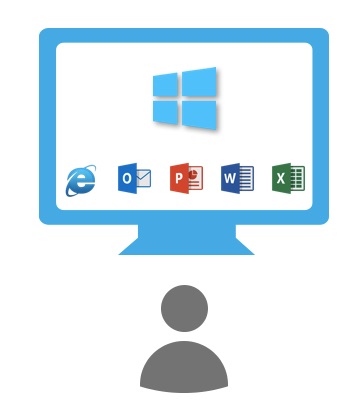
For decades, workers started their “digital day” with their PCs or Macs — mostly using applications and productivity tools. The Integration model was whatever was installed locally; the Security model was whatever they had protected with their PC password.  Maybe they used a browser, but 99% of the time, it was to consume information from the web. And it worked… for a while.
digital-day-1-pc-only
Then, we became browser-centric

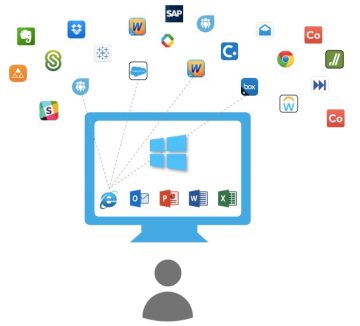
Over time, more of our work lives were spent with browser-based applications (think SalesForce, WorkDay, SAP). Gradually, the success of cloud-delivered SaaS apps — which were soon available as apps on our phones, too — began to dominate our work days. Plus, lots of useful apps, such as Evernote and DropBox, were organically adopted by employees, creating “Shadow IT” problems within companies. Thus began the first true phase of cloud sprawl, where the digital work environment became disaggregated. Worse yet, some services had different browser requirements, users had multiple logins, and IT had little-to-no insight into who had access to what. Even still, more and more of our time was being spent “outside the desktop” using externally sourced services. 
digital-day-2-browser

Today, nearly everything resides outside your desktop

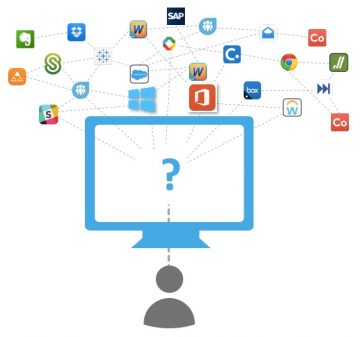
Fast-forward to today. The vast majority of apps you use are either browser-based, fully web-based apps, or full mobile apps (particularly true when you think about how you use apps on your cell phone). The only things, really, that workers use that are “native” to the PC or Mac are productivity tools like Microsoft Office (unless you’re a digital native, you probably eschew that in favor of Google docs, yet another external service.) In fact, even Microsoft Office is being disaggregated from the PC desktop, with the prevalent use of Office 365.

So, we have to ask ourselves two questions: (a) is the desktop (as a “container” of apps) relevant anymore, and (b) if not, what becomes the new access and aggregation point for a worker’s apps and data?
digital-day-2-5-disaggregated

IT – and users – need a new way to aggregate, secure, access, and deliver cloud services


Let’s assume we had never started with a desktop PC at all and that all of your necessary work applications were just a mix of on-premises apps, browser-based apps, mobile apps and cloud/SaaS services.
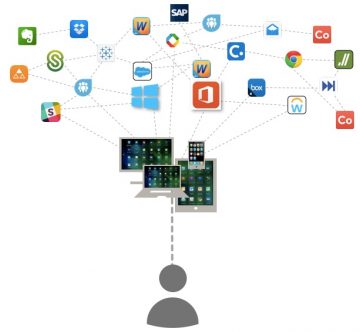
We’d want our IT departments to have a way to onboard and aggregate each service into a curated and controlled “workspace” environment. Each employee would have workspace of their own — one with a single login, with policies that controlled which apps they had access to, end even workflow tools between apps and coworkers. Even better, we’d want the workspace to ensure that apps with native UIs, browser UIs, and even device-dependent UIs would all be available consistently on any device. Best of all, we’d want this controlled “space” to follow workers around on their devices, whether they were using their laptop, a borrowed tablet, their personal phone, or any device of their choosing.
digital-day-3-sdw


The digital workspace is real, and it’s now: Where you’ll start your “digital day”

The relatively new notion of the “secure digital workspace” is increasingly the way workers will access the resources they need, and how IT will aggregate, secure, and deliver all applications, regardless of where they’re generated or which personal devices are being used for access.
And it will be contextual and personal — you’ll have it available on all of your devices, and it will know if you’re using a secure device, if you’re on a secure network, and even whether you’re in a secure location. This means that you might not have full access rights to certain apps based on where you are or what network you’re on, or the system may change the method of delivery to ensure better security. It might even notice you’re simultaneously logged into two devices in two countries and raise a security flag.

For workers, this approach will simplify how they get to all the apps and data they need to be productive, and will make it possible to easily collaborate with coworkers, contractors, partners, and customers. And it will ensure consistency by bringing disparate applications and data into a user-centric, context-aware environment. Finally, it will optimize their experience, performance and security across any device, platform or network — regardless of the platform for which the original app may have been designed.
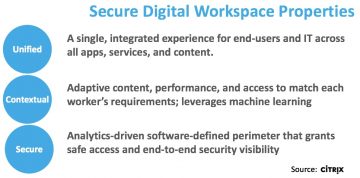
digital-day-sdw-properties

For corporate IT, it will help them restore control over their employee’s digital environment because a secure digital workspace ensures better, more consistent control over on-boarding, aggregating, and managing access across hybrid cloud services, regardless of their source. And overall, this unified approach reduces risk for companies because the entire workspace is surrounded by a “Secure-Digital Perimeter” across infrastructure, apps, delivery networks, and devices.

If this sounds interesting, I encourage you to look into the possibilities, such as using the Citrix workspace to aggregate, secure, access, and deliver this new world of possibilities to workers near you.

Transforming CIOs into IT Supply Chain Managers

A version of this post was originally published to Citrix Blogs

How Citrix Cloud services are adding to IT’s business value
The role of the CIO – indeed for of all of IT – is changing. Jobs that used to be tactical engineering and integration of technology are morphing into strategic positions that instead integrate external services. As I’ve observed in the past, CIOs are transforming IT supply chain managers, and it’s happening in the digital workspace market now more than ever.
This is one of the basic assumptions we made when developing Citrix Cloud. Unlike monolithic IaaS or PaaS clouds, Citrix Cloud is designed to be a services integration and management platform. It focuses on simplifying the integration across a number of infrastructure and workspace services, each of which may reside in different locations and/or clouds. The result is a new IT integration platform that focuses on providing business (not technology) outcomes.
While thinking about this in the context of Citrix Cloud, I’ve noticed a number of generalizable principles across a number use cases, as well as some specific principles for creating secure mobile workspaces:
General Principles – for IT supply chain integration

  1. Assemble, don’t build – Now more than ever, IT must ask itself the classic buy-versus-build question: Should they be in the business of building/operating any software at all? If so, what compelling business or competitive need (i.e. data sovereignty, security) is driving the decision? If a driver does not exist, , IT needs to let vendors operate noncritical services.
  1. Consume services, don’t generate applications – IT should be adopting a consumption model for services, not be in the business of running applications. Their time should be spent on higher-value activities like integration and workflow for services, not creating the services themselves.
  1. Think hybrid first, think SaaS first – no single cloud or outsourcing approach fits all. Any modern strategy for service management and outsourcing has to assume hybrid cloud and has to assume multiple SaaS providers. Like any other vendor strategy, IT has to assume changes will happen over time, and therefore keep vendor options open.
  1. IT’s job is to focus on business outcomes, not technology – Today, IT outcomes must be additive to the business – not simply play a support role. In the past, IT often focused on cost reduction, but today they should be more focused on strategic enablement of the business. So, when thinking about sourcing and integrating services, the aim should be to enable lines-of-business — not to shave expenses.
  1. Enable assembly of core services – For the average information worker, a digital workspace is comprised of different services that may be sourced from different locations, e.g. desktops, applications, storage, device control, access control. The core of any workspace supply chain ought to consist of most/all of these.   Some may inherently be SaaS cloud services — others might be local. It all depends upon constraints such as security, compliance, technology “bench strength,” and of course economics.
  1. Anticipate the need for multiple services and multiple workspaces – The average information worker may use many applications and services, and each worker type may well require different amounts and combinations of these. Therefore, anticipate integrating dozens if not hundreds of apps into different families of workspaces – one for each worker type.
  1. Enable choice – As a supply chain manager, IT will need to ensure that vendor choice is preserved. This principle extends beyond where SaaS services are sourced from, and continues on to where IaaS resources reside as well. You’ll want to maintain control of where data, IP, and other sensitive information resides. For example, locking-into using a single cloud for service execution may not give you the long-term flexibility you’ll need or require.
  1. Evaluate technology on driving value up and less on driving cost down – As a strategic enabler, the IT supply chain manager should understand line-of-business needs today and anticipate them for tomorrow. For example, rather than focusing on driving cost out of managing desktop hardware, IT needs to focus more energy on driving in more value – such as making desktop access more mobile, more accessible, and more secure. Focus on assemblingin value-add services such as file synch and share, mobility applications and/or unified communications.
  1. Don’t Forget: your chief outcome must be employee productivity – In the end, IT’s goal should enable workers to do their jobs better. Focus on productivity, user satisfaction, flexibility. Tools like Citrix Cloud are designed around these principles:
  • Speed – responding to employee needs or competitive pressures
  • Simplicity – the ease of selecting and instantly integrating new services or capabilities
  • Choice – the ability to source services from any cloud

Specific Principles – for workspace integration
In building a workspace supply chain, we here at Citrix applied these principles to developed tools to help companies leverage them. The following design principles for Workspace Cloud extended the four above principles into a platform that’s fast, simple and flexible to use:
How Citrix Helps
Citrix Cloud is more than a new delivery mechanism for Citrix technologies. It’s a platform that helps IT speed and simplify high-value service assembly.  In the coming months, you’ll see Citrix add even more service types — increasing the breadth of control IT will have when delivering high-quality workspace services that will absolutely delight your employees.

Thursday, October 5, 2017

Your Next Computer.... in the Cloud ?

For years, the “virtual PC” has been the dream of users and corporations alike. After all, why do millions of us lug around a laptop with our Windows desktop stuck to it? Why do we risk theft, loss or damage to valuable data when our entire workspace — and data – could instead live in the cloud and be accessed from anywhere by any of our devices….

[This is a re-post of my Blog on Wired Innovation InsightsClick to read more]

Monday, January 2, 2012

My Cloudy Nerdy Playlist for 2012

Political movements have their anthems. Starbucks has its background music brand. But I thought it might be fun to collate a playlist that specifically appeals to the techie/cloudy group.

So here goes. Some of these are pretty funny... others leave a bit to be desired.  And if you know of more (or have favorites of your own) send them my way and I'll add them...

Songs about Clouds

Other (mostly funny) songs about IT
Techy Poetry
    Even MORE Links...

    Wednesday, May 6, 2009

    In their own words: Valley CTOs' Blogs & Tweets

    I noticed that I subscribe to feeds from a number of CTO-like folks, so I thought I'd publish a few of my favorites:

    Sun's CTO,
    Greg Papadopoulos - Blog
    I love listening to Greg - definitely a visionary, definitely well-connected. He's the guy I referenced back in 2007 when he observed that The World Only Needs 5 Computers. Looking like this concept is really coming true.
    Cisco's CTO, Padmasree Warrior - Blog - Twitter
    Padmasree's blog started getting major traction when Cisco "leaked" their UCS system. As Cisco's visionary, she has unbelievable insight into where IT is going, with a great sense of "humanity" and realism thrown in.
    Amazon's CTO, Werner Vogels - Blog - Twitter
    What can I say? As the chief spokesperson for Amazon Web Services, he does a great job championing All Things Cloud. I had the opportunity to see him a few months ago at the Cloud Computing Expo in NY, and his vision is compelling.
    Intel CTO, Justin Rattner - Blog
    While only an occasional Blogger, he definitely reflects Intel's position on a number of issues and technologies.
    BMC Software CTO, Tom Bishop - Blog
    Tom has a great way of posing thought questions and industry issues from an Enterprise Management perspective. He doesn't seem to get lots of comments on his Blog, though. Wonder why. :|
    Novell's CTO, Jeff Jaffe - Blog
    A frequent blogger (and, I might add, so is Novell's CMO). I like this blog b/c I think it gives a real sense of where his (and Novell's) mind is at.
    HP's Cloud Services CTO, Russ Daniels - Blog
    Russ is HP's visionary in the cloud/SaaS space. Very cool guy. Unfortunately his Blog reads more like Twitter updates. But he's posted a few interesting videos to the web recently.

    These are the guys I track... and I'm surprised that more tech companies either don't have official CTOs, or don't tend to condone Blogging/Tweeting.

    Which others do you follow?

    Monday, May 4, 2009

    Lessons from Glassblowing for High-Tech marketing

    This past weekend I spent 6 hours learning the very basics of glassblowing. It's been on my "bucket list" for quite some time, and when a good friend suggested we try it, I jumped on the opportunity. But what I didn't realize was that there were lessons I got in the studio that are metaphors for my "day job" too.

    BTW, the lesson was given at San Francisco's Public Glass studios - a fabulous resource near one of San Francisco's largest artists communities. Cool galleries but even cooler artisans at work. Glassblowing has been around since ancient Egypt, I think. And in
    many ways it hasn't changed very much. The tools are still very simple, and the raw materials are still the same. And so begin my observations:

    It's way harder than it looks: Nothing beats experience and experimentation, and no amount of watching beats actual doing. You notice this the second you take your first blob of glass from the furnace and simply try to keep it symmetrical and from falling to the floor. You have to develop an intuitive feel for temperature, malleability, and a muscle-memory for working with the material.
    All the business books in the world only get you so far. You need to get your hands dirty. And frankly, nothing beats learning from a really good failure. Once you see a product cancelled (or for that matter, a company die) you finally gain a real appreciation for what to do, not just what not to do. Ya' can't get that from a book.
    Heat is your friend (but be careful): You find that you only have a minute or two of work time before you need to re-heat a piece. But be wary - you're operating at temperatures above 2,000F (and as high as 2,500F sometimes) which means even standing in front of an oven - even 6 feet away - is something you can only tolerate for a few seconds. Going back-and-forth doesn't give you lots of time to cool-of and pat your forehead.
    Hype, profile and momentum is what you strive for. But it can be fleeting. When you're "hot" you've got clout, but it dies-down quickly. Drumming-up conversations - or even controversy - in the social network realm is great. It keeps you in play. Just don't overdo it or you'll be toast. :)
    From basic materials & tools can arise massively different implementations: Yes, there are a few different types of glass (some w/higher melting points, clarity, etc.) and a few different tools (basic steel pincers, scissors, wooden shaping cups, and yes - even wet newspaper to help shape). But that's it. Then the creativity begins. How you manipulate the glass viscosity, temperature gradients & selective cooling, layers of glass, color etc. is infinitely variable. The sky's the limit.

    And even in tech, the basic marketing principles (the four P's, segmentation, etc.) haven't changed in a long time. But using them in clever/innovative ways is the trick. Making sure you stand-out in the crowd, above the noise-level, is still more of an art than a science. Play with the combinations, repeat them, think about re-combining in new ways. Be creative and brainstorm with others.
    Keep things moving! Hot glass is essentially fluid, much like really think molasses. The second you stop spinning the glass, it'll start sagging. Plus, the really good artisans spin smoothly and transition back/forth smoothly too. Never stop.
    And, never stop experimenting; never let-off on the accelerator with PR, AR, or marketing programs; keep the "buzz" going, keep the plates spinning. If you're complacent or don't have an agenda for next month or quarter, start now.
    Cool slowly: Too much thermal change is bad. Big pieces experience internal thermal stresses, and will shatter if cooled too fast. Most pieces have to be cooled in a controlled manner over 24 hours.
    And too much change is bad to any organization. Plan making your go-to-market changes slowly, over many quarters. I've seen organizations that want to radically change marketing themes and messages every quarter (or month!). Give the market at least 2-3 quarters to absorb new positioning/messaging. Unless you're consumer goods, customer buying cycles can be long... the changes will confuse them if too often.
    Work as a team: Big pieces need at least two -- and sometimes as many as four -- people to help. Different pieces need to be prepped, warmed, blown, held, etc. It's choreographed in advance. Everyone knows their job. Running into someone holding a piece of glass at 2,000F can really spoil your day.
    Ditto. In business, as in art, working as a team is critical -- Always good to have frequent status meetings, and over-communicate your actions/intentions. Just because a project looks like you can do it alone doesn't always mean you should. Socialize your efforts even as you're doing the project -- and even ask for input even if you may not need it -- getting early ownership from others means buy-in from them too.

    Wednesday, April 1, 2009

    eBay Is Really a Huge PaaS Provider

    While Amazon, Salesforce.com, Google & others seem to be getting the "cloud" attention lately, it seems that eBay is doing a brilliant platform move - very much akin to what Salesforce.com is already doing.

    eBay has announced its Selling Manager Applications Beta, which is really a number of hosted services, each complete with its own API.
    eBay Selling Manager Applications allows developers to help professional sellers manage their online businesses within their trusted My eBay experience. Professional sellers are like any small business, and quality selling management tools embedded into the Selling Manager experience will make them more efficient and profitable. Sellers will be able to find and easily subscribe to applications through an applications directory.
    Some of the APIs include
    - Shopping
    - Merchandising
    - Feedback
    - Client Alerts
    - Platform Notifications
    - Large Merchandise
    - Research

    eBay's roadmap page and current .PDF. eBay is also implementing these APIs using the gadgets specification as defined within OpenSocial.


    What appeals to me here is that, unlike "raw" hosted compute services (a la AWS), and unlike raw platform tools (a la Google App Engine), eBay has chosen to host core services for use (and re-use via mashups) by others. eBay is putting its core IP on the web for others to use.

    Not convinced at the potential? Consider the following thought experiment: What if eBay provides a highly-reliable, generalized trading application that matches Puts and Calls? What if a public company were to allow the engine to match and record trades of its shares using that engine? Could it eventually usurp the NASDAQ engine?

    Now think even a bit more differently -- rather than a service that matched simple pricing (for shares or for simple commodities), what about a service that matched trades for more complex variables? For example, different grades and granular chemical compositions of crude oil, complete with amounts and delivery dates? Jobs and job seekers? Singles looking for dates?

    eBay clearly has the opportunity to be more than an online e-commerce site. It could be the "Exchange Platform" in the sky. Very cool possibilities, well beyond the simple way we're thinking of cloud services today.

    Wednesday, March 18, 2009

    A data center trifecta? (Prediction)

    Once in a while, I sit back and think about what are the real transformational forces that will change how IT operates. And I've come to the conclusion that there are 3 fundamental technological movements that will do this... and the 3rd will surprise you.

    1. Software virutalization.
    No surprise here. Abstracting software from the underlying CPU yields mobility, consolidation, and degrees of scalability. It also simplifies automated management and portability of workloads, such as with virtual appliances / AMIs. Aside from a few managerial kinks being worked-out, this technology is already accepted de-facto, esp. because we're already seeing it become a commodity play, and sedimenting into other products.

    2. Infrastructure orchestration / unified computing.
    This is the one we're all beginning to hear about. As I recently outlined, this technology is a perfect complement to software virtualization -- it essentially gives "mobility" to infrastructure, rather than to software. It allows IT operations to define I/O, storage connectivity and networking entirely in software, resulting in stateless and re-configurable CPUs. Egenera was the pioneer in this area, but the market is now getting an adrenaline shot-in-the-arm from Cisco's UCS announcement.

    Unified computing / Infrastructure orchestration is valuable because it enables a highly-reliable, scalable and re-configurable infrastructure -- a perfect platform for physical *and* virtual software. It permits IT to "wire-once" and then create CPU configurations (virtual NICs, HBAs, networks/VLANs, storage connections) using a unified/consolidated networking fabric. Plus, it is a simple, elegant, cleary-more-efficient approach. Think of this as provisioning hardware using software. This approach has numerous positiv properties - not the least of which are that you can clone hardware configurations when you need to (a) scale, (b) migrate, (c) fail-over, and (d) recover from entire system failures [disasters]. Again, regardless of physical or virutal payloads.

    We'll see this technology begin to accelerate in the market. Promise.

    3. Intelligent software provisioning
    "Huh?" I hear you say? Yes! While I'm not sure what this market segment may eventually be called, it represents the third critical data center managemnet component. #1 gives software mobility; #2 yields infrastructure flexibility. And #3 is how the actual software (physical, virtual, appliances, AMIs, etc.) is constructed and "doled-out" as a workload on #1 and #2.

    My eyes were opened after learning more about a company called FastScale. Picture an intelligent software provisioning system that knows minimum-amount-required of software libraries needed to run an OS or application. As it turns out this is usually something only around 10%-15% of the multi-gig bag-of-bits you try to boot every time you bring up a server. And that even includes the VM, where virtual systems are involved.

    The result? 3 really nice properties:
    a) Speed. Getting applications up-and-running an order-of-magnitude faster. Not having to move as many bits over the network to boot a given server is a real time and money saver.
    b) More efficient consolidation. With smaller software footprints, more VMs, appliances, etc. can fit on a given memory footprint. That means that denser consolidation is frequently possible -- not to mention $ savings on those gigs of memory you have to buy when you consolidate.
    c) Inherent configuration management. With a database of all libraries and bits, plus knowing where you put them, you can always monitor configurations and verify compliance, etc. Plus, you can track what patches went where (and frequently, you may find you don't even need the patch if it's not a critical component to the reduced libraries you're using!)
    d) Ability to provision into any form of container: In other words, this system can provision onto a bare-metal CPU, into a VM, or for that matter, into an appliance like an AMI if you're using a compute cloud. Wow, very neat.

    This intelligent provisioning approach is also highly-complementary to existing compliance and config management products like OpsWare (HP) or BladeLogic (BMC).

    Summary
    So what if you have all 3 of these technologies? You'd have a data center where
    • Workloads were portable, and relatively platform-independent
    • Infrastructure was instantly re-configurable and adapted to business conditions, failures, etc.
    • Software could be distributed and brought-up on the order of seconds, allowing near-instantaneous adaptation to scale, business demand or failures.
    Pretty sweet, eh?


    Sunday, April 20, 2008

    More of "Open Source Music"

    Wow. It's validating to read Thomas Dolby's Blog (TED's musical director) where he's remixed Radiohead's "Nude". Radiohead is going a step further than anyone by offering "Stems" to the song on iTunes, and setting up a remix contest.

    Why validating? This isn't just a remix where you mash-up two songs - this is the artist offering-up original unmixed tracks... It's exactly the open-sourcing of music I predicted on my March 4 blog.

    Boy, would I love to see other artists begin to do this -- It could be just what the recording industry needs to spice-up the market. Turn fans into an extension of the artists themselves!

    Sunday, April 13, 2008

    Repurposing Technology + Power of YouTube

    I just came across this Ted.com video by Johnny Lee. In it he demos his Wii Remote hacks... taking a standard $40 game part and adapting it to power things like a digital whiteboard, a multitouch display and a head-mounted 3-D viewer. (Other projects by Johnny at Carnegie Mellon U are here)

    His brilliant tenet is this: Millions of $ have been spent developing foundational technology like the Wii Remote -- which can then be applied to dozens of *different* applications. Factor in the ability of YouTube to share ideas, and you've got a fantastic acceleration of technology and solutions.

    Saturday, November 3, 2007

    What the Green Data Center Can Learn from the Prius

    With The announcement of Active Power Management, and now the Cassatt Active Response product line, I hope that data center operations will now nudge a little closer to the 21st century.

    Here's analogy #1: You're driving and come to a red light, you stop the car but the engine keeps running. It's wasteful and inefficient, but because it's generally considered too inconvenient to sta
    rt & stop your engine every time you hit a red light, nobody does it. Enter the Prius: Come to a red light, and the engine automatically stops; hit the accelerator, and it starts again. Simple. Automatic. Efficient.

    That's the analogy Cassatt is bringing to servers -- if they sit idle, even for an hour a day, they're automatically shut off and re-started when
    they're needed. For production environments, this might only apply to a few scale-out architectures that are provisioned for busy times-of-day, but for Development/Test, there are *always* machines that go unused for periods of time. Cassatt's Active Power Management takes care of this automatically. Simple. Automatic. Efficient.

    Don't just believe me. On Aug. 2, the EPA published a Report to Congress on Server and Data Cen
    ter Efficiency. A core tenet in the report states "implement Power Management on 100% of applicable servers" was a core aspect to "improved operation" of US data centers.

    Oh - and here's analogy #2: (and believe-it-or-not, it's from Detroit as well as Japan): It's called Cylinder Shutdown. Turns out that when you literally don't need all the engine's horsepower, cylinders within the engine are dynamically shut down. Check out the future Northstar XV12 Caddy engine, as well the engine in the 2008 Honda Accord.

    Turns out, Cassatt technology can do this with IT Servers/blades as well! If you have a farm of servers and a few are sitting idle, they're turned off and kept as "bare metal" until some application needs their horsepower. Then they're dynamically re-purposed for whatever application is needed. That's the ultimate in capital efficiency.

    Can this really work? With customers we've spoken to -- some with development environments pushing 4,000 servers -- actively controlling server power & repurposing can save nearly 50% (that's fifty) of operational costs.

    Think of all the cars idling at this very moment, and the amount of fuel they're burning. Now, think of all of the servers in your data centers & labs just sitting there waiting to do something. And think of all the Watts they're chewing.


    Tuesday, October 9, 2007

    Is Cloud Computing Mainstream?

    Well, not yet. But by now you've probably heard of the deal between IBM and Google to provide an initial 6 universities (University of Washington in Seattle, Carnegie Mellon University, Massachusetts Institute of Technology, Stanford University, University of California at Berkeley and University of Maryland) with hardware to allow students to program to the cloud.

    But this just accelerates my prediction that the concept of "cloud computing" will quickly mature. Folks are beta-testing Amazon's (somewhat fault-prone) EC2 and S3, upon-which anything from components (i.e. queuing services) to entire website storage, can be hosted.

    So now, students will be educated in this form of programming, and go into industry with a new level of comfort with this paradigm. This will surely turn the hosting market on its ear in 1-2 years.

    Saturday, April 28, 2007

    SmugMug's Don MacAskill and Utility Computing

    Surfing has its benefits. I tripped over SmugMug CEO Don MacAskill's Blog today. SmugMug is a rough competitor to Flickr and other (lower-grade) photo archiving sites. They archive about 130,000,000 photos right now. And They use Amazon's S3.

    This is a perfect commercial example of server-less IT I spoke about last week. And it's proof that the economics of Utility Computing are compelling. MacAskill estimated that he's saving about $500,000 anually by not buying and managing his own storage (he computes the number in his blod). And he expects that number to increase. Amazon has taken the traditional approach to managing storage (S3) and computing (EC2) and applied a utility automation paradigm -- enabling a completely new cost model. How else could they be offering such pricing to users?

    What's this going to enable in the future, Read on: MacAskill's other Blog: "Amazon+2 Guys = The Next YouTube". (aka the server-less web service!)

    I gotta keep wondering: When is corporate IT going to catch onto this utility computing approach, and make "compute clouds" out of their own stuff?

    Friday, January 12, 2007

    The world only needs 5 computers

    Back in November 2006, Greg Papadopoulos, Sun's CTO, offered up a Blog positing that the compute world will consolidate down to 5 big compute facilities (i.e. Google, Yahoo!, Amazon, eBay, Salesforce.com). I might humbly also add a carrier like Verizon... Not that anybody won't have laptops, and not that enterprises won't have data centers. It's just that the really large, generalizable, economy-of-scale computing will become outsourced and centralized.

    And hey, it's happening already - and any IT professional (and even small business owner?) has to start thinking about it:
    • Applications are being delivered as a "service" both on salesforce.com - and on their sister site, AppExchange. In fact, AppExchange is essentially a community where 3rd-parties can contribute compatible applications that salesforce.com then hosts as a service.
    • Google (and others) are dipping their toe in the water (and more!) by providing applications like calendars, spreadsheets & productivity tools, and others, in a hosted environment - they store all data - and not just documents. i.e. I used their Browser Synch to store all bookmarks, personal preferences, etc. -- so, no matter what computer I sit down at, I have my entire browser preferences available. Doesn't this really begin to blur the line between local computing and what happens in the "cloud"? hey, and maybe stay tuned for the much-rumored "Gdrive"...
    • Amazon.com - here's the big entrant - offering-up their "Elastic Compute Cloud" (EC2) as well as their "simple storage service" (S3), and even a queueing service. Users can leverage Amazon's huge IT infrastructure by creating virtual machines of any flavor and deploying applications of their choice on them, using the EC2 storage, etc. It's getting to the point where I won't need a backup drive, and IT managers don't need a single in-house server.
    So, consider this: the picture above confirms that the compute world is moving toward "compute utilities".

    How are we going to get there? 2 ways - "Build" and "transition".
    • Build - well, that's exactly what the above companies are doing - it requires lots of capital, and a huge user base. And the race is off...
    • Transition - by this I mean, decreasing the barriers-to-adoption of using these resources. For example, on the consumer side, look at things like JungleDisk, a new entrant, that makes it simple & accessible for anyone with a PC to use the Amazon S3 - and for only $0.15/month/GB. I might not need a hard drive soon. And for example, on the enterprise side, consider utility automation controllers like Collage, where compute requirements will be assigned to the most economically-advantageous resources -- either in-house, or perhaps, to Amazon's EC2!
    I know the electricity analogy is getting old - but it's really happening in computing: we're moving from lots of different home-owned "generators" with their unique 1-off construction - the way it was at the dawn of the industrial revolution (OK, think home Solar power), to one where the vast majority of users pull resource off of a utility, where the generation happens in a place with very high economies-of-scale.